
Blooket is an engaging platform where teachers interact with students and play games that help in learning. However many students look for a short way that allows them to get answers quickly or give them coins to buy from Blooket/Market. That’s where Blooket hacks come in.
In this guide, we’ll show you some simple hacks that you can use to enhance your Blooket games even on your school PC. You can use these blooket hacks for coins, minesraft2, and many other games. These blooket hacks originated from Git Hub from many owners i.e. glizzy, therealgliz, Glixer, and many others. So stick with us as there are some minor techniques that you need to focus on.
How To Download Blooket Hacks in 2026?
To get hacks and use them in Blooket, follow the steps written below:
- First, you’ll need to download the gui.js file, or simply open it on browser window.
- Click the button below. It will open the main GUI.js file directly in your browser window.
- Or you can also visit our GitHub repository and download it from there.
- In any case you just need to copy the Java script code from GUI.js file.
How To Use Blooket Hacks
In this section, we will walk you through the steps to use Blooket hacks. Just follow these straightforward steps:
- Open the Script File
- Once you have click the Download GUI.js button, it will directly open the gui.js file in you browser:
- If you have download the GUI.js file from GitHub repository you can open and see the code by using these programs,
- Windows: Notepad, Notepad++, or Visual Studio Code
- Mac: TextEdit, Sublime Text, or Visual Studio Code
- Linux: gedit, vim, nano, or any code editor
- You’ll see the JavaScript code inside. You just need to copy all the Java code.
- Copy All the Code
- Select all the text in the gui.js file and copy it:
- Press Ctrl + A (Windows/Linux) or Cmd + A (Mac) to select all
- On Android (Mobile Devices) Press and hold long and than choose “Select all” and than select “Copy” to copy all the code.
- Press Ctrl + C (Windows/Linux) or Cmd + C (Mac) to copy
- Make sure you’ve copied everything from the very first character to the very last!
- Open Blooket and Join a Game
- Navigate to Blooket.com in your web browser and join or host a game. The Blooket Hacks GUI works with all game modes including:
- Gold Quest
- Cafe
- Factory
- Tower of Doom
- Racing
- And many more!
- Open Browser Console
- Now you need to open the browser’s developer console. Here’s how for different browsers:
- Google Chrome / Microsoft Edge: – Press F12, or – Press Ctrl + Shift + J (Windows/Linux) – Press Cmd + Option + J (Mac) – Or right-click anywhere → Inspect → Console tab
- Firefox: – Press F12, or – Press Ctrl + Shift + K (Windows/Linux) – Press Cmd + Option + K (Mac) – Or right-click anywhere → Inspect Element → Console tab
- Safari: – Enable developer menu: Preferences → Advanced → Show Develop menu – Press Cmd + Option + C – Or Develop → Show JavaScript Console
- You’ll see a panel appear at the bottom or side of your browser with lots of technical information. Look for the “Console” tab.
- Now you need to open the browser’s developer console. Here’s how for different browsers:
- Paste and Execute the Code
- Click in the console where you see the command prompt (usually a
>symbol), then: - Press Ctrl + V (Windows/Linux) or Cmd + V (Mac) to paste the code
- Press Enter to run the script
- Note: Some browsers may show a warning about pasting code into the console. This is normal! Type “allow pasting” if prompted, then paste again.
- Click in the console where you see the command prompt (usually a
- Use the GUI Interface
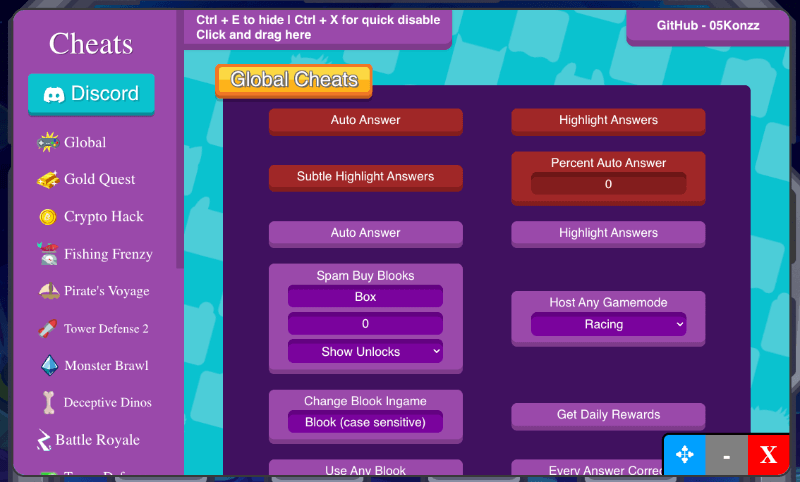
- Once executed, the Blooket Hacks GUI will appear on your screen! You’ll see a user-friendly interface with various options and features. Explore the different tabs and settings to understand how the game works.
- The GUI is intuitive and designed to be self-explanatory. Each feature includes helpful descriptions so you know exactly what it does.
- Select Your Desired Blooket Hacks
- Once the GUI menu appears, browse through the available Blooket cheats and click on the ones you want to activate. You can enable multiple hacks at once! Popular options include:
- Set Tokens – Instantly get unlimited Blooket tokens
- Set Gold – Max out your gold in Gold Quest mode
- Auto Answer – Automatically answer all questions correctly
- Highlight Answers – See correct answers highlighted in green
- Remove Name Limit – Use longer names and special characters
- Game-specific hacks for Tower Defense, Racing, Cafe, Factory, and more
- Enjoy Your Enhanced Blooket Experience!
- That is it! You are now using Blooket hacks successfully. The cheats will stay active for the duration of your game session. If you refresh the page or go to a new game, you will have to put in the code again (which takes a few seconds). Enjoy and use the hacks responsibly!
Pro Tips
- You need to paste the code every time you start a new game session
- The script runs locally in your browser – nothing is installed on your computer
- You can bookmark the code for quick access (some browsers support this)
- If something doesn’t work, try refreshing the page and starting over
- Make sure you’re using a modern, updated web browser